maXfolders icon

maXfolders · Mac App Store · free to use, with everything for two months

One pane or two. Your whole workflow.

maXfolders is a file manager that starts with one clean folder view and grows a second pane when you want one: Source and Destination side by side, folder compare, Sync Browsing and Git status. It is free to use, and everything is included for two months. After that the free features stay, and one purchase through the Mac App Store, $9.99 for each major version, brings back the rest and comes with a license for maXfolders Pro.

Use it free, unlock the rest when you want

  1. 1
    Install it free.

    Get maXfolders from the Mac App Store. Everything is included for two months, and the footer shows how many days are left. Nothing to sign up for.

  2. 2
    Keep going when the trial ends.

    When the trial ends, maXfolders stays yours with its free features: browsing, copy, move, rename, the Shelf, Find, Preview and your tabs and saved connections are all still there. Choose Unlock maXfolders in the app, any time, to bring back the rest. It is a one-time In-App Purchase of $9.99, handled by the App Store.

  3. 3
    Pro comes with it.

    The same purchase includes a license for maXfolders Pro, which adds the tools the Mac App Store does not allow. Here is how to claim it.

One purchase per major version

The unlock covers the version you buy, and every update within it, for good. A new major version (2.0, 3.0) is a new purchase and starts with its own two months with everything included.

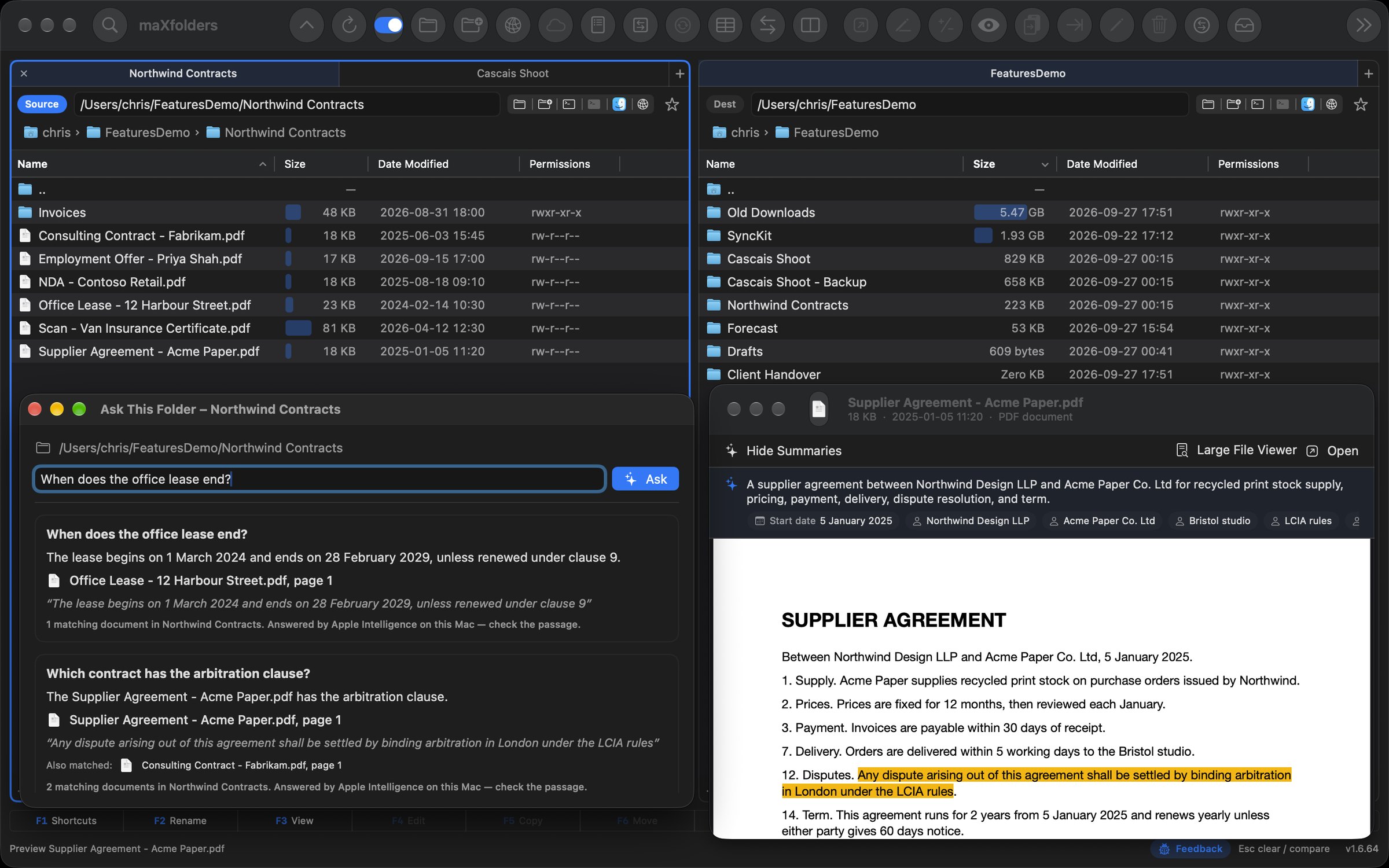
maXfolders with two panes: a folder of contracts on the left, with tabs, and folders sorted by size with size bars on the right, and Apple Intelligence answering questions about the documents View larger
Add a second pane for Source on the left and Destination on the right, or hide it again and keep one clean folder view.

Which one is for you?

MAC APP STORE · FREE TO USE

maXfolders

Free, with everything for two months, then $9.99 once

  • Free, always: tabs, one pane or two, copy, move, rename, the Shelf, Find, Preview, Folder Compare and Sync Browsing
  • With the trial or the unlock: Quick Edit, bulk operations, Clean Folder, Sort Into Folders, Contact Sheets, Version History, FTP, SFTP, WebDAV, S3, Dropbox and Apple Intelligence
  • One purchase per major version, through the App Store; the free features stay either way
  • Includes a license for maXfolders Pro
DIRECT FROM MAXFOLDERS.COM

maXfolders Pro

Included with maXfolders

  • Everything in maXfolders, not sandboxed
  • Clean Disk, embedded terminal, Finder integration, Git Assistant
  • iCloud Photos, 7-Zip & RAR archives and undo
  • two months included to try, then your maXfolders purchase unlocks it